
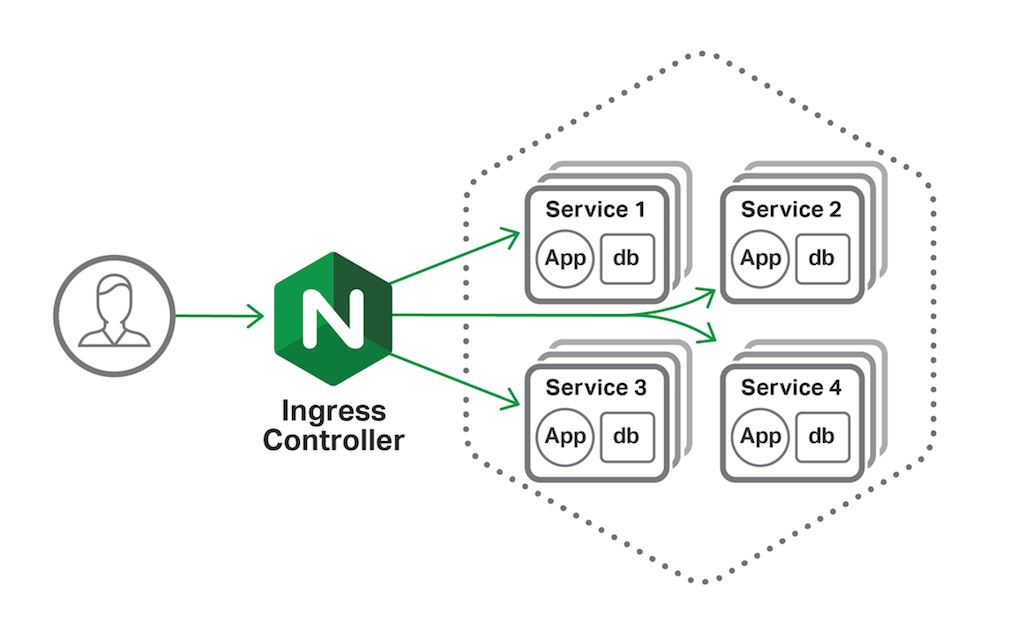
Using Nginx on Kubernetes as a Load Balancer Service with YAML Manifests
As the adoption of Kubernetes continues to grow, many of us are looking for robust solutions to manage load balancing within our clusters. Nginx, a powerful and flexible web server, is a popular choice for this purpose. In this post, we’ll explore how to use Nginx as a load balancer service on Kubernetes using YAML manifests, avoiding the complexity of Helm, and making it understandable that how nginx works. We’ll also cover how to set up SSL certificates using secrets and configure an ingress resource.
Prerequisites
Before we dive in, ensure you have the following:
- A running Kubernetes cluster.
kubectlconfigured to interact with your cluster.- An SSL certificate and its corresponding key.
- Basic understanding of Nginx and it’s uses
- DNS config and SSL certificates
Step 1: Create a Namespace
We’ll start by creating a namespace to isolate our Nginx resources.
apiVersion: v1
kind: Namespace
metadata:
  name: nginx-load-balancer
Apply this manifest with:
kubectl apply -f namespace.yaml
Step 2: Create a Secret for SSL Certificate
Store your SSL certificate and key in a Kubernetes secret. Can be generated using Let’s Encrypt.
apiVersion: v1
kind: Secret
metadata:
  name: tls-secret
  namespace: nginx-load-balancer
type: kubernetes.io/tls
data:
  tls.crt: <base64-encoded-cert>
  tls.key: <base64-encoded-key>
Encode your certificate and key using:
base64 -w 0 < your_certificate.crt
base64 -w 0 < your_key.key
Replace
kubectl apply -f ssl-secret.yaml
Remember to update the TXT records for SSL challenge in your DNS provider settings.
Step 3: Deploy Nginx Deployment
Deploy Nginx as a pod within your cluster, which is a nginx controller and allows routing to diffrent services.
apiVersion: apps/v1
kind: Deployment
metadata:
  name: nginx-deployment
  namespace: nginx-load-balancer
spec:
  replicas: 2
  selector:
    matchLabels:
      app: nginx
  template:
    metadata:
      labels:
        app: nginx
    spec:
      containers:
      - name: nginx
        image: nginx:latest
        ports:
        - containerPort: 80
        - containerPort: 443
Apply the deployment:
kubectl apply -f deployment.yaml
Step 4: Expose Nginx with a Service
Create a service to expose Nginx pods. This is of type Load Balancer and on listing k8s services, you will get a public IP which becomes the entry point for all other services.
apiVersion: v1
kind: Service
metadata:
  name: nginx-service
  namespace: nginx-load-balancer
spec:
  selector:
    app: nginx
  ports:
  - protocol: TCP
    port: 80
    targetPort: 80
  - protocol: TCP
    port: 443
    targetPort: 443
  type: LoadBalancer
Apply the service:
kubectl apply -f service.yaml
Step 5: Configure Ingress Resource
Define an ingress resource to route traffic to your Nginx service, leveraging the SSL certificate stored in the secret.
apiVersion: networking.k8s.io/v1
kind: Ingress
metadata:
  name: nginx-ingress
  namespace: nginx-load-balancer
  annotations:
    nginx.ingress.kubernetes.io/ssl-redirect: "true"
spec:
  tls:
  - hosts:
    - your-domain.com
    secretName: tls-secret
  rules:
  - host: your-domain.com
    http:
      paths:
      - path: /
        pathType: Prefix
        backend:
          service:
            name: nginx-service
            port:
              number: 80
Replace your-domain.com with your actual domain name. Apply the ingress manifest:
kubectl apply -f ingress.yaml
Remember to update the A Record in your DNS provider settings to redirect traffic to the Load Balancer IP.
Eureka
By following these steps, you’ve successfully set up Nginx as a load balancer on Kubernetes using YAML manifests. This approach provides a straightforward method to manage your configuration, ensuring a clear and maintainable deployment process. Feel free to tweak these manifests to fit your specific use case, and happy deploying!